
GlassWorm Malware Uses Solana Dead Drops to Deliver RAT and Steal Browser, Crypto Data
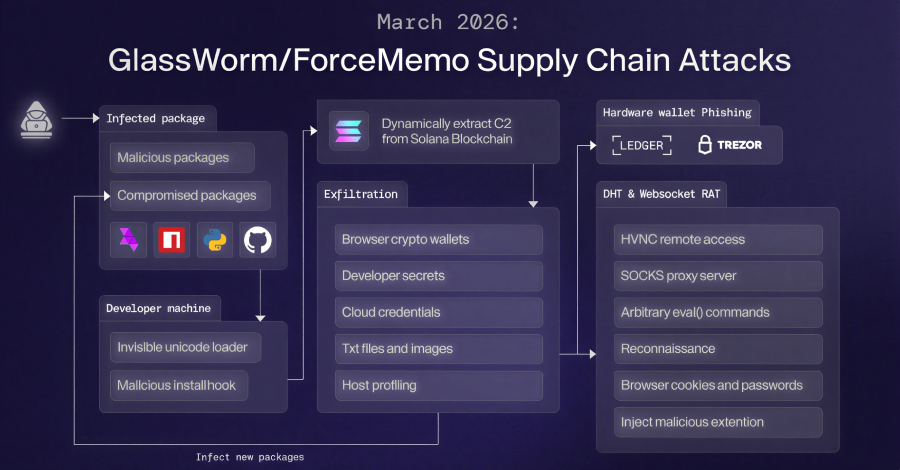
GlassWorm Malware Evolves: Solana, Google Calendar Abused for C2 and Crypto Theft
For General Readers (Journalistic Brief)
Cybersecurity experts have identified a significant and worrying upgrade in the methods used by a sophisticated malware campaign known as "GlassWorm." This advanced threat is now using the public ledger of the Solana cryptocurrency blockchain and even public events on Google Calendar as stealthy communication channels. Think of it like a secret code hidden in plain sight, making it incredibly hard for regular security software to spot.
The main goal of GlassWorm is to steal valuable information. This includes details from cryptocurrency wallets, personal data stored in web browsers, and critical login session information that could be used to impersonate users. Adding to its malicious toolkit, the malware installs a deceptive add-on for the Google Chrome browser, specifically designed to extract a wide array of user data.
Adding another layer of evasion, the malware actively avoids systems configured with a Russian language setting, strongly suggesting a targeted approach. Furthermore, the campaign's ability to compromise software development tools means that developers could unintentionally introduce this threat into the software that millions of people and businesses rely on, posing a broad and significant risk to digital security.
Technical Deep-Dive
1. Executive Summary
An advanced iteration of the GlassWorm malware campaign has been identified, leveraging novel Command and Control (C2) infrastructure that utilizes the Solana blockchain's memo field and public Google Calendar events for C2 resolution. The campaign deploys a sophisticated multi-stage data exfiltration framework, including a Remote Access Trojan (RAT) and a malicious Google Chrome extension. This extension is designed to pilfer sensitive browser data, session tokens, and cryptocurrency wallet information. The malware exhibits targeted evasion techniques, notably avoiding systems configured with a Russian locale. The full CVSS score is not publicly disclosed. The severity is classified as CRITICAL due to the comprehensive data exfiltration capabilities, direct targeting of financial assets, and sophisticated evasion techniques.
2. Technical Vulnerability Analysis
- CVE ID and Details: Not publicly disclosed. This campaign appears to exploit legitimate functionalities of various services rather than a specific software vulnerability with a CVE identifier. The primary mechanism is the abuse of legitimate service features for malicious purposes.
- Root Cause (Code-Level): The fundamental root cause lies in the abuse of legitimate service functionalities for malicious purposes, rather than a traditional software flaw.
- Solana Blockchain Memo Field: The "vulnerability" is in the design or implementation of how applications interact with the Solana blockchain, specifically the memo field. This field is intended for transaction descriptions but is being used to store encoded C2 parameters. This can be classified under CWE-20: Improper Input Validation if the parsing of memo data on the C2 server is insecure, or CWE-770: Allocation of Resources Without Limits or Throttling if the memo field size is exploited for data stuffing. More broadly, it falls under CWE-499: Exploitation of Software Vulnerabilities if the interaction with the blockchain API itself is insecurely handled by the malware or the C2 infrastructure.
- Google Calendar Event URLs: The vulnerability is in the trust placed in public calendar event data as a reliable and secure source of information. This can be categorized under CWE-20: Improper Input Validation if the parsing of event data retrieved from calendar APIs or URLs is insecure, or CWE-74: Improper Neutralization of Special Elements in Output Used as a File or Operating System Command if the retrieved data is not properly sanitized before being interpreted or executed.
- Supply Chain Compromise: The initial access vector relies on the compromise of legitimate software repositories (npm, PyPI, GitHub, Open VSX) and maintainer accounts. This falls under CWE-1188: Insecurely Stored Credentials (for compromised accounts) and CWE-494: Code Without Integrity Check (for poisoned package updates).
- Websocket RAT & Chrome Extension: The RAT and extension exploit CWE-20: Improper Input Validation in how they handle data received over Websocket and browser APIs, and CWE-79: Improper Neutralization of Input During Web Page Generation ('Cross-site Scripting') if they interact with web content insecurely. The phishing component leverages CWE-200: Exposure of Sensitive Information to an Unauthorized Actor and CWE-22: Improper Limitation of a Pathname to a Restricted Directory ('Path Traversal') if it manipulates system paths to display fake errors or access files.
- Affected Components:
- Initial Access Vector:
- npm packages (e.g.,
watercrawl-mcp-serverimpersonation) - PyPI packages
- GitHub repositories
- Open VSX marketplace
- MCP (Model Context Protocol) ecosystem (impersonated WaterCrawl MCP server)
- npm packages (e.g.,
- Command and Control (C2) Infrastructure:
- Solana Blockchain (specifically transaction memo fields)
- Public Google Calendar events
- Distributed Hash Table (DHT)
- Direct IP addresses (e.g.,
45.32.150[.]251,217.69.3[.]152,45.150.34[.]158)
- Payloads:
- .NET binary for hardware wallet phishing (targets Windows)
- Websocket-based JavaScript RAT (targets Windows and macOS)
- Malicious Google Chrome extension ("Google Docs Offline") (targets Windows and macOS)
- Targeted Endpoints:
- Windows operating systems
- macOS operating systems
- Google Chrome browser
- Ledger and Trezor hardware wallets (via phishing)
- Initial Access Vector:
- Attack Surface:
- Developer Workstations/Build Environments: Exposed through the use of compromised software repositories and dependencies. This is a critical entry point for supply chain attacks.
- End-User Workstations: Exposed through the execution of malicious code delivered via supply chain attacks or direct infection.
- Web Browsers: Specifically Google Chrome, targeted by the malicious extension for extensive data harvesting.
- Cryptocurrency Wallets: Directly targeted via sophisticated phishing techniques aimed at hardware wallet users, exploiting user trust and panic.
- CI/CD Pipelines: Potentially affected if they pull dependencies from compromised repositories or if build artifacts are tampered with during the build process.
3. Exploitation Analysis (Red-Team Focus)
- Red-Team Exploitation Steps:
- Initial Access (Supply Chain Compromise):
- Prerequisites: Access to developer environments or systems that consume packages from npm, PyPI, GitHub, or Open VSX. This can be an automated build system or a developer's workstation.
- Access Requirements: None for unauthenticated users pulling packages. For maintainer account takeover, requires compromised credentials or session hijacking on repository platforms.
- Exploitation Steps:
- Option A (Poisoned Dependencies): A developer or automated build process pulls a malicious package (e.g.,
watercrawl-mcp-serverimpersonation). The package's post-install script or imported code executes malicious logic upon installation or import. - Option B (Account Takeover): Threat actor gains administrative access to a legitimate maintainer's account on a repository platform (npm, PyPI, GitHub). They then push a malicious update to an existing, trusted package.
- Option A (Poisoned Dependencies): A developer or automated build process pulls a malicious package (e.g.,
- Payload Delivery: The malicious code is executed locally on the compromised system as part of the package installation or update process, typically with user-level privileges.
- C2 Infrastructure Discovery & Payload Retrieval (Stage 1):
- Prerequisites: Successful initial access, network connectivity to external services.
- Access Requirements: Local execution privileges on the compromised host.
- Exploitation Steps:
- The initial malware binary attempts to discover C2 servers and retrieve subsequent payloads.
- Primary Method (Solana): Queries the Solana blockchain for transaction memos containing encoded C2 information. This involves constructing and submitting transactions with specific memo content or querying blockchain explorers/APIs for recent transactions with unusual memo fields. The malware parses these memos for C2 server addresses or configuration data.
- Secondary Method (Google Calendar): If Solana lookup fails or is unavailable, it fetches C2 server addresses and OS-specific payloads from public Google Calendar event URLs. This involves parsing event descriptions or URLs for embedded data.
- Tertiary Method (DHT): Utilizes a Distributed Hash Table for C2 resolution as a fallback.
- Direct IP Connection: If other methods fail, it may attempt to connect to hardcoded or previously resolved IP addresses (
45.32.150[.]251,217.69.3[.]152,45.150.34[.]158).
- Payload Delivery: The malware downloads the second-stage data exfiltration framework from the resolved C2 infrastructure.
- Data Exfiltration Framework Execution (Stage 2):
- Prerequisites: Successful retrieval and execution of the exfiltration framework.
- Access Requirements: Local execution privileges.
- Exploitation Steps:
- Credential Harvesting: Scans local system for stored credentials in browsers, OS credential managers, and common applications.
- Cryptocurrency Wallet Exfiltration: Targets local wallet files, seed phrases, or private keys stored insecurely on the filesystem.
- System Profiling: Gathers detailed system information including OS version, hardware details, installed software, user accounts, network configuration, and running processes.
- Data Aggregation: Compresses collected data into a ZIP archive.
- Exfiltration: Transmits the ZIP archive to a designated external server using standard protocols (e.g., HTTP/S POST requests).
- Final Payload Retrieval: Initiates the download of the final payload components, such as the RAT and the Chrome extension.
- Final Payload Deployment & Execution (Stage 3):
- Prerequisites: Successful exfiltration of Stage 2 data and retrieval of final payload components.
- Access Requirements: Local execution privileges.
- Exploitation Steps:
- .NET Hardware Wallet Phisher:
- Detection: Uses WMI queries (
SELECT * FROM Win32_USBDevice WHERE Manufacturer LIKE '%Ledger%' OR Manufacturer LIKE '%Trezor%') to detect connected hardware wallets. This query can be executed by standard user accounts. - Phishing Trigger: Upon detection, it forcefully terminates legitimate wallet applications (
taskkill /IM <wallet_process_name> /F). - UI Spoofing: Displays a fake "configuration error" or "emergency reboot" message, designed to trick the user into entering their 24-word recovery phrase.
- Persistence: If the phishing window is closed by the user, the malware may attempt to re-launch it.
- Detection: Uses WMI queries (
- Websocket JavaScript RAT & Chrome Extension:
- RAT Execution: Establishes a persistent Websocket connection to a C2 server for remote command execution. This allows attackers to control the infected machine interactively.
- Chrome Extension Installation: Forces the installation of the "Google Docs Offline" extension on Chrome (Windows/macOS). This is likely achieved by manipulating Chrome's extension management APIs or configuration files directly, bypassing standard user consent flows.
- Extension Data Exfiltration: The extension operates with broad permissions to collect:
- Cookies (
document.cookie) localStoragedata- DOM tree snapshots of visited pages
- Bookmarks (
chrome.bookmarks.getTree) - Screenshots (via browser APIs or OS calls)
- Keystrokes (via browser event listeners or OS hooks)
- Clipboard content (
navigator.clipboard.readText()) - Browser history (up to 5,000 entries,
chrome.history.search) - List of installed extensions (
chrome.management.getAll)
- Cookies (
- Targeted Surveillance: Monitors specific websites (e.g., Bybit, a cryptocurrency exchange) for sensitive cookies like
secure-tokenanddeviceid, which can be used for session hijacking. - Redirect Rules: Can dynamically modify browser settings to redirect users to attacker-controlled URLs.
- .NET Hardware Wallet Phisher:
- Initial Access (Supply Chain Compromise):
- What privileges are needed?
- Initial Access: Typically requires user-level privileges to execute downloaded code from package managers. Account takeover of maintainers grants administrative privileges on the repository platform itself, but not necessarily on end-user systems unless they pull compromised code.
- Post-Exploitation: Standard user privileges are generally sufficient for most exfiltration and RAT operations, including the WMI queries for hardware wallets and the installation/operation of the Chrome extension. However, to forcefully terminate wallet applications (
taskkill) or manipulate system-wide browser settings/policies, elevated privileges (Administrator/root) might be beneficial or required.
- Network requirements?
- Remote Exploitation: Yes, for initial access via compromised repositories.
- C2 Communication: Requires outbound internet connectivity to Solana RPC nodes, Google Calendar servers, DHT nodes, and direct attacker-controlled C2 IP addresses. Ingress filtering on firewalls would be a primary defense against direct C2 connections.
- Public PoCs and Exploits: No specific CVEs or publicly available exploit modules (e.g., Metasploit) are referenced. However, the underlying techniques (supply chain compromise, dead drop C2, browser extension abuse, hardware wallet phishing) are well-documented attack vectors. Researchers have published analyses and detection tools (e.g.,
glassworm-hunterby AFINE). - Exploitation Prerequisites:
- Use of vulnerable software repositories (npm, PyPI, GitHub, Open VSX) that host poisoned packages.
- Developer or user downloading and executing packages from these repositories.
- Network connectivity to Solana RPC endpoints, Google Calendar servers, DHT infrastructure, or attacker-controlled C2 servers.
- Target systems must not be configured with a Russian locale (a specific evasion technique).
- Google Chrome browser installed and actively used by the victim for the extension to be effective.
- User interaction is required for the hardware wallet phishing component to succeed (i.e., the user must enter their recovery phrase).
- Automation Potential: High. The initial compromise through supply chain attacks can be automated by threat actors publishing malicious packages. C2 discovery via Solana and Google Calendar can be automated by the malware. The RAT and extension operate autonomously once deployed on the victim's system. Worm-like propagation is not explicitly mentioned but could be a future evolution if the RAT gains lateral movement capabilities.
- Attacker Privilege Requirements:
- Initial Access: Low-privilege user on a developer machine for package installation. Administrative privileges on repository platforms for account takeover and code injection.
- Post-Exploitation: Low-privilege user is sufficient for most data exfiltration and RAT operations. Elevated privileges may be required for deeper system access, persistence mechanisms not detailed, or to bypass certain security controls.
- Worst-Case Scenario:
- Confidentiality: Complete compromise of sensitive data including user credentials, session tokens, private keys, seed phrases, browsing history, financial information, and proprietary business data.
- Integrity: Potential for data modification if the RAT has write capabilities. Users could be redirected to fraudulent websites, leading to direct financial loss through phishing or credential theft. System integrity can be compromised by the installation of persistent malware.
- Availability: Disruption of user access to cryptocurrency wallets (e.g., by terminating applications and prompting for recovery phrases), potential system instability due to malicious processes, and loss of productivity for affected users and organizations.
4. Vulnerability Detection (SOC/Defensive Focus)
How to Detect if Vulnerable:
- Package Manager Audit:
- npm:
npm audit(requires a registry with known vulnerabilities, may not detect novel supply-chain compromises directly unless the package itself is flagged by security vendors). - Python:
pip-auditorsafety checkagainst known vulnerable packages. - GitHub: Dependabot alerts for known vulnerable dependencies.
- npm:
- File System and Registry Scans:
- Scan for the presence of the "Google Docs Offline" extension files in Chrome's user data directory:
%LOCALAPPDATA%\Google\Chrome\User Data\Default\Extensions\<extension_id>\. The specific<extension_id>needs to be identified. - Check Chrome's registry keys for suspicious extension entries or modified update URLs:
HKCU\Software\Google\Chrome\PreferenceMACs\<user_sid>\Extensions\<extension_id>\update_url. - Scan for the .NET phishing binary, if its typical filename or location is known (Not publicly disclosed).
- Scan for the presence of the "Google Docs Offline" extension files in Chrome's user data directory:
- Process Monitoring:
- Look for
chrome.exeprocesses with unusual command-line arguments related to loading extensions (--load-extension). - Monitor for
WMI Provider Host (WmiPrvSE.exe)activity that queries for hardware wallet manufacturers (e.g., "Ledger", "Trezor"). - Monitor for unusual .NET processes executing, especially those that don't match legitimate applications and are running in user contexts.
- Look for
- Network Traffic Analysis:
- Monitor DNS queries for Solana RPC endpoints or unusual domains associated with C2.
- Analyze network traffic for connections to the known C2 IPs:
45.32.150[.]251,217.69.3[.]152,45.150.34[.]158. - Inspect HTTP/S traffic for unusual POST requests containing large ZIP archives or suspicious JSON payloads.
- Monitor for Websocket connections to unknown or suspicious endpoints.
- Configuration Artifacts:
- Absence of legitimate Chrome extensions where "Google Docs Offline" is present.
- Unusual entries in Chrome's
Extensionsregistry keys orSecure Preferencesfile, particularly modifiedupdate_urlvalues.
- Package Manager Audit:
Indicators of Compromise (IOCs):
- File Hashes: Not publicly disclosed.
- Network Indicators:
- IP Addresses:
45.32.150[.]251,217.69.3[.]152,45.150.34[.]158. - Domains: Unknown, as C2 is obfuscated via blockchain and calendar.
- Protocols: HTTP/S, Websockets, potentially Solana RPC (UDP/TCP).
- Suspicious DNS Queries: To Solana RPC endpoints, or domains associated with the attacker's infrastructure if resolved.
- IP Addresses:
- Process Behavior Patterns:
chrome.exelaunching with suspicious command-line arguments like--load-extension=<path_to_malicious_extension>.WmiPrvSE.exeexecuting WMI queries for hardware wallet manufacturers (Win32_USBDevicefiltered byManufacturer).- Unusual .NET processes with no clear user-initiated purpose, especially those that terminate other processes or establish network connections.
- Processes attempting to terminate legitimate cryptocurrency wallet applications (e.g.,
taskkilltargetingledger-live.exe,trezor-suite.exe).
- Registry/Config Changes:
- Addition of malicious extension ID to Chrome's
Extensionsregistry keys (HKCU\Software\Google\Chrome\PreferenceMACs\<user_sid>\Extensions\<extension_id>\). - Modification of
update_urlfor extensions to point to attacker-controlled servers. - Presence of specific Chrome extension configuration files in user data directories (
%LOCALAPPDATA%\Google\Chrome\User Data\Default\Extensions\<extension_id>\).
- Addition of malicious extension ID to Chrome's
- Log Signatures:
- Solana Transaction Memos: Long, seemingly random strings in transaction memos that don't correspond to typical descriptions. These may appear as Base64-encoded data.
- Google Calendar Event Data: Unusual or encoded data within public calendar event descriptions or URLs.
- Chrome Extension Installation Events: EDR logs showing installation of extensions without explicit user consent or via suspicious command lines.
- WMI Event Logs:
Microsoft-Windows-WMI-Activity/Operationallogs showing queries for hardware wallet manufacturers. - Process Creation Logs:
Sysmon Event ID 1showingchrome.exewith suspicious arguments, or the execution of the .NET phishing binary.
SIEM Detection Queries:
1. KQL Query: Detecting Suspicious Solana Transaction Memo Activity
This query aims to identify network traffic patterns that might indicate the use of Solana transaction memos for C2 communication. It requires network flow logs or proxy logs that capture HTTP/S requests and potentially their payloads or metadata.// Azure Sentinel - KQL let SolanaRPC_IPs = dynamic(["104.16.141.73", "104.16.140.73", "172.67.136.22", "172.67.137.22"]); // Example Solana RPC IPs, needs to be updated with actual observed IPs let SuspiciousMemoPattern = @"^[a-zA-Z0-9+/]{64,}$"; // Heuristic for a base64-like encoded string, common for data stuffing let MinMemoLength = 60; // Minimum length for a potentially malicious memo NetworkConnections | where RemoteIP in (SolanaRPC_IPs) // Filter for connections to known or suspected Solana RPC endpoints | where Protocol == "TCP" and DestinationPort == 8080 // Example: Monitor a specific port used for RPC, adjust as needed | extend RequestBody = tostring(AdditionalFields["RequestBody"]) // Assuming RequestBody is logged and contains transaction details | extend Memo = extract_all(SuspiciousMemoPattern, RequestBody) // Extract potential memo strings | mv-expand Memo | where isnotempty(Memo) and strlen(Memo) >= MinMemoLength | project Timestamp, SourceIP, DestinationIP, DestinationPort, Memo, UserAgent, Url | where UserAgent !contains "Solana CLI" and UserAgent !contains "Solana Explorer" // Exclude known legitimate client traffic | summarize count() by Timestamp, SourceIP, DestinationIP, UserAgent, Url, Memo | where count_ > 0 // Flag if any suspicious memos are foundLog Sources: Network Flow Logs, Proxy Logs, DNS Logs.
Explanation: This query filters network traffic to known Solana RPC IP addresses. It then attempts to extract and analyze strings within the request body that match a pattern for encoded data (like Base64) and exceed a minimum length. It also tries to exclude known legitimate Solana client traffic based on User-Agent strings.2. Sigma Rule: Malicious Chrome Extension "Google Docs Offline" Installation
This rule targets the installation of the malicious Chrome extension by looking for specific file system or registry modifications.title: Malicious Chrome Extension "Google Docs Offline" Installation id: 20260325-glassworm-chrome-ext status: experimental description: Detects the installation of the malicious "Google Docs Offline" Chrome extension, associated with the GlassWorm campaign. author: SOC Analyst date: 2026/03/25 references: - https://thehackernews.com/2026/03/glassworm-malware-uses-solana-dead.html logsource: category: file_event # Or registry_event, process_creation depending on EDR capabilities product: windows detection: selection_chrome_ext_path: TargetFilename|contains: '\Google\Chrome\User Data\Default\Extensions\' TargetFilename|endswith: '\google_docs_offline_extension_id\' # Replace with actual extension ID if known selection_chrome_reg_update_url: RegistryKey|contains: '\Software\Google\Chrome\PreferenceMACs\' RegistryKey|contains: '\Extensions\' RegistryValue|contains: 'update_url' RegistryValue|contains: 'attacker_controlled_update_server' # Placeholder for attacker server URL selection_chrome_cmdline: ProcessName: chrome.exe CommandLine|contains: '--load-extension=' CommandLine|contains: 'google_docs_offline_extension_id' # Placeholder for extension path condition: any of selection_* falsepositives: - Legitimate installation of other Chrome extensions (if not properly filtered) level: high tags: - attack.persistence - attack.privilege_escalation - attack.t1547.001 # Boot or Logon Autostart Execution: Registry Run Keys / Startup Folder - attack.t1071.001 # Application Layer Protocol: Web Protocols - attack.t1185 # Browser Session HijackingLog Sources: EDR File Integrity Monitoring, EDR Registry Monitoring, Process Creation Logs (Sysmon Event ID 1).
Explanation: This Sigma rule defines detection logic for the malicious Chrome extension. It looks for specific file paths within Chrome's user data directory that correspond to the extension's installation, or registry modifications related to extension update URLs. It also flags Chrome processes launched with command-line arguments indicating the loading of an extension. The placeholdersgoogle_docs_offline_extension_idandattacker_controlled_update_serverwould need to be replaced with actual observed values.Behavioral Indicators:
- Sudden increase in outbound network traffic from user workstations, especially to unusual destinations or using non-standard protocols.
- User reports of cryptocurrency wallet applications crashing or displaying unexpected error messages.
- Users reporting being prompted to enter recovery phrases for their hardware wallets without initiating a legitimate transaction.
- Unusual Chrome browser behavior, such as unexpected redirects, pop-ups, or the appearance of unfamiliar extensions.
- System performance degradation due to background processes performing data collection and exfiltration.
- Detection of WMI queries targeting specific hardware devices (e.g., USB devices with specific manufacturers).
- Execution of unsigned or untrusted executables, particularly .NET binaries, in user contexts that do not align with typical application behavior.
- Anomalous activity within transaction memos on the Solana blockchain, especially if they contain long, encoded strings.
5. Mitigation & Remediation (Blue-Team Focus)
- Official Patch Information: No specific patches are mentioned for the underlying abuse of Solana and Google Calendar. Patches would be relevant for any vulnerabilities in the Solana client libraries, Google Calendar API wrappers, or the operating systems/browsers themselves if they have exploitable flaws. The primary mitigation is not patching a vulnerability, but rather blocking the abuse of legitimate services and securing the supply chain.
- Workarounds & Temporary Fixes:
- Network Segmentation & Firewall Rules:
- Block outbound connections to known malicious C2 IPs:
45.32.150[.]251,217.69.3[.]152,45.150.34[.]158. - Implement strict egress filtering to restrict outbound connections to only necessary IPs and ports.
- Monitor and potentially block traffic to Solana RPC endpoints if they are not essential for legitimate business operations. This requires careful analysis to avoid disrupting legitimate financial transactions.
- Monitor and potentially block access to public Google Calendar URLs if they are not essential for legitimate business operations.
- Block outbound connections to known malicious C2 IPs:
- Web Application Firewall (WAF) / API Gateway:
- Implement rules to detect and block suspicious patterns in HTTP/S requests that might indicate C2 communication or data exfiltration (e.g., unusually large POST payloads, specific user agents).
- Rate-limit requests to external services that could be abused for C2.
- Browser Extension Policy:
- Enforce a strict browser extension policy via Group Policy Objects (GPO) or Mobile Device Management (MDM) to only allow approved extensions.
- Disable the ability for users to install extensions from the Chrome Web Store or other untrusted sources.
- Supply Chain Security Controls:
- Implement strict dependency management policies. Use tools to scan dependencies for known vulnerabilities and malicious code.
- Maintain an allowlist of trusted package repositories and specific packages.
- Consider using private package registries and vetting all packages before they are added.
- Enable multi-factor authentication (MFA) on all developer accounts for code repositories and package managers.
- Endpoint Security Hardening:
- Configure EDR policies to detect and block suspicious process execution, WMI queries, and file modifications related to the observed TTPs.
- Disable or restrict the execution of unsigned or untrusted executables.
- User Education:
- Train users on the risks of supply chain attacks and the importance of verifying package sources.
- Educate users about hardware wallet security, emphasizing never to enter recovery phrases into any software interface and to be wary of unexpected prompts.
- Train users to identify and report suspicious browser behavior or extension installations.
- Network Segmentation & Firewall Rules:
- Manual Remediation Steps (Non-Automated):
- Identify and Isolate Infected Systems: Use EDR/SIEM alerts and network monitoring to identify potentially compromised hosts. Isolate these systems from the network to prevent further spread or C2 communication.
- Remove Malicious Chrome Extension:
- Via Chrome Settings: Navigate to
chrome://extensions/. Find "Google Docs Offline" and click "Remove". - Via Registry (Windows):
- Open Registry Editor (
regedit.exe). - Navigate to
HKEY_CURRENT_USER\Software\Google\Chrome\PreferenceMACs\<user_sid>\Extensions\<extension_id>\. - Delete the
update_urlvalue or the entireextension_idkey. - Navigate to
HKEY_LOCAL_MACHINE\Software\Google\Chrome\PreferenceMACs\<user_sid>\Extensions\<extension_id>\. - Delete the
update_urlvalue or the entireextension_idkey. - Note: The
<user_sid>will vary per user profile. The<extension_id>for "Google Docs Offline" needs to be identified.
- Open Registry Editor (
- Via File System (Windows/macOS):
- Locate the extension's directory in Chrome's user data:
%LOCALAPPDATA%\Google\Chrome\User Data\Default\Extensions\<extension_id>\. - Delete the entire extension directory.
- Locate the extension's directory in Chrome's user data:
- Via Chrome Settings: Navigate to
- Remove Malicious .NET Binary (if found):
- Locate and delete the malicious executable file. Its location and name are not publicly disclosed.
- Check scheduled tasks or startup entries for persistence mechanisms.
- Clean Infected Development Environments:
- Rebuild Dependencies: Remove the compromised package from
package.json,requirements.txt, etc., and reinstall dependencies using lock files or known good sources. - Scan Project Files: Run static analysis tools on project code to identify any embedded malicious scripts or logic.
- Reset Credentials: If maintainer accounts were compromised, reset passwords and revoke all active sessions immediately.
- Rebuild Dependencies: Remove the compromised package from
- Review and Harden System Configurations:
- Implement stricter firewall egress rules.
- Enforce browser extension policies via GPO/MDM.
- Update EDR/AV signatures and policies to include behavioral detections for the observed TTPs.
- Reimage or Rebuild Systems: For critical systems or if full compromise is suspected, consider reimaging or rebuilding from a known good backup and trusted source images.
- Risk Assessment During Remediation:
- Temporary Loss of Functionality: Disabling extensions or blocking network access might temporarily disrupt legitimate user workflows.
- Incomplete Removal: If malicious components are not fully removed (e.g., persistence mechanisms overlooked), the system remains at risk of reinfection or continued compromise.
- Data Loss: If systems are reimaged without proper data backup, legitimate data could be lost.
- Reinfection: Without addressing the root cause (e.g., supply chain security, user education, credential hygiene), systems are vulnerable to reinfection.
- False Positives: Overly aggressive network blocks or EDR rules could impact legitimate business operations.
6. Supply-Chain & Environment-Specific Impact
- CI/CD Impact: High. The campaign directly targets software repositories (npm, PyPI, GitHub) which are foundational to CI/CD pipelines.
- Build Pipelines: If pipelines pull dependencies from compromised repositories, they will ingest malicious code, leading to poisoned artifacts that are then distributed to downstream consumers.
- Artifact Repositories: Malicious code can be embedded into build artifacts (e.g., Docker images, executables), which are then distributed to downstream consumers.
- Dependency Management: The trust placed in dependency management systems is fundamentally undermined. The integrity of the software supply chain is compromised.
- Container/Kubernetes Impact: Moderate to High.
- Docker: If a Docker image is built using a compromised base image or pulls malicious dependencies from a compromised registry during the build process, the resulting image will contain the malware. This can lead to the deployment of infected containers.
- Kubernetes: Kubernetes itself is not directly vulnerable to this specific campaign's initial access vector. However, compromised container images deployed within a Kubernetes cluster will execute the malware. Container isolation effectiveness is limited if the malware is embedded within the container image itself. Lateral movement within the cluster could be a concern if the RAT has such capabilities and network policies are permissive.
- Supply-Chain Implications: Severe. This campaign is a prime example of a sophisticated supply-chain attack.
- Weaponization: The threat actors are actively weaponizing the supply chain by poisoning legitimate software distribution channels, leveraging the trust inherent in these platforms.
- Dependency Management: It highlights the critical need for robust dependency management, including vulnerability scanning, provenance verification, and the use of trusted sources. The reliance on open-source components, while beneficial for development speed, introduces significant risk if not managed with rigorous security controls.
7. Advanced Technical Analysis
- Exploitation Workflow (Detailed):
- Reconnaissance & Preparation: Threat actors identify popular open-source projects on npm, PyPI, GitHub, and Open VSX. They may also compromise legitimate developer accounts through credential stuffing or phishing. They prepare malicious packages or code snippets designed to execute specific payloads.
- Initial Compromise (Supply Chain):
- Malicious packages are published to public repositories or pushed as updates to existing, trusted projects.
- Developers or automated build systems (
npm install,pip install,git clone) pull these compromised dependencies. - The
postinstallscript or imported code within the malicious package executes malicious logic upon installation or import, staging the first-stage malware.
- C2 Discovery (Stage 1):
- The initial malware binary executes.
- It constructs a transaction with a specially crafted memo field and submits it to the Solana network (or queries an RPC node for this information). The memo contains encoded C2 server details or configuration data.
- If Solana lookup fails, it fetches data from a public Google Calendar event URL. This involves parsing the URL or event description for encoded C2 information.
- If both fail, it may query a DHT for C2 server addresses.
- The malware resolves the IP address of the C2 server from the retrieved information.
- Payload Download & Execution (Stage 2):
- The malware establishes a connection to the resolved C2 IP address.
- It downloads the second-stage data exfiltration framework.
- This framework executes, performing credential harvesting, cryptocurrency wallet exfiltration, and system profiling.
- Collected data is archived into a ZIP file and exfiltrated to the C2 server
